介绍
Simple and Fast Multimedia Library

多媒体
SFML 提供简单的接口使你容易开发游戏和多媒体应用 教程和 API
五大模块
system系统window窗口graphics图形audio音频network网络

多平台
支持 Windows, Linux, macOS,很快也会支持 Android & iOS
编译好的 SDK 下载地址

多语言
官方支持 C 和 .Net 平台语言,社区支持 Java, Ruby, Python, Go 等多种语言
查看更多 bindings page.

教程
SFML and Xcode (macOS)
推荐 frameworks,尽管 dylibs 和 frameworks 可在同一系统同时安装(我都安装了)
frameworks- 复制
Frameworks下所有内容到/Library/Frameworks
- 复制
dylibs- 复制
lib下所有内容到/usr/local/lib - 复制
include下所有内容到/usr/local/include
- 复制
SFML 依赖
- 复制
extlibs下所有内容到/Library/Frameworks
Installing SFML
Xcode 模板
- 复制
templates下所有内容到~/Library/Developer/Xcode/Templates
- macOS
SFML AppmacOS AppSFML CLT传统 Unix 程序
问题
SFML App
1 | ditto: can't get real path for source '/Users/SFML/Desktop/packaging/tmp/install/Library/Frameworks/sfml-system.framework' |
2 | couldn't copy /Users/SFML/Desktop/packaging/tmp/install/Library/Frameworks/sfml-system.framework to /Users/iosdevlog/Library/Developer/Xcode/DerivedData/X-czgcehtuernfweapkkunlrhgcjqf/Build/Products/Debug/X.app/Contents/Frameworks//sfml-system.framework |
3 | Command PhaseScriptExecution failed with a nonzero exit code |
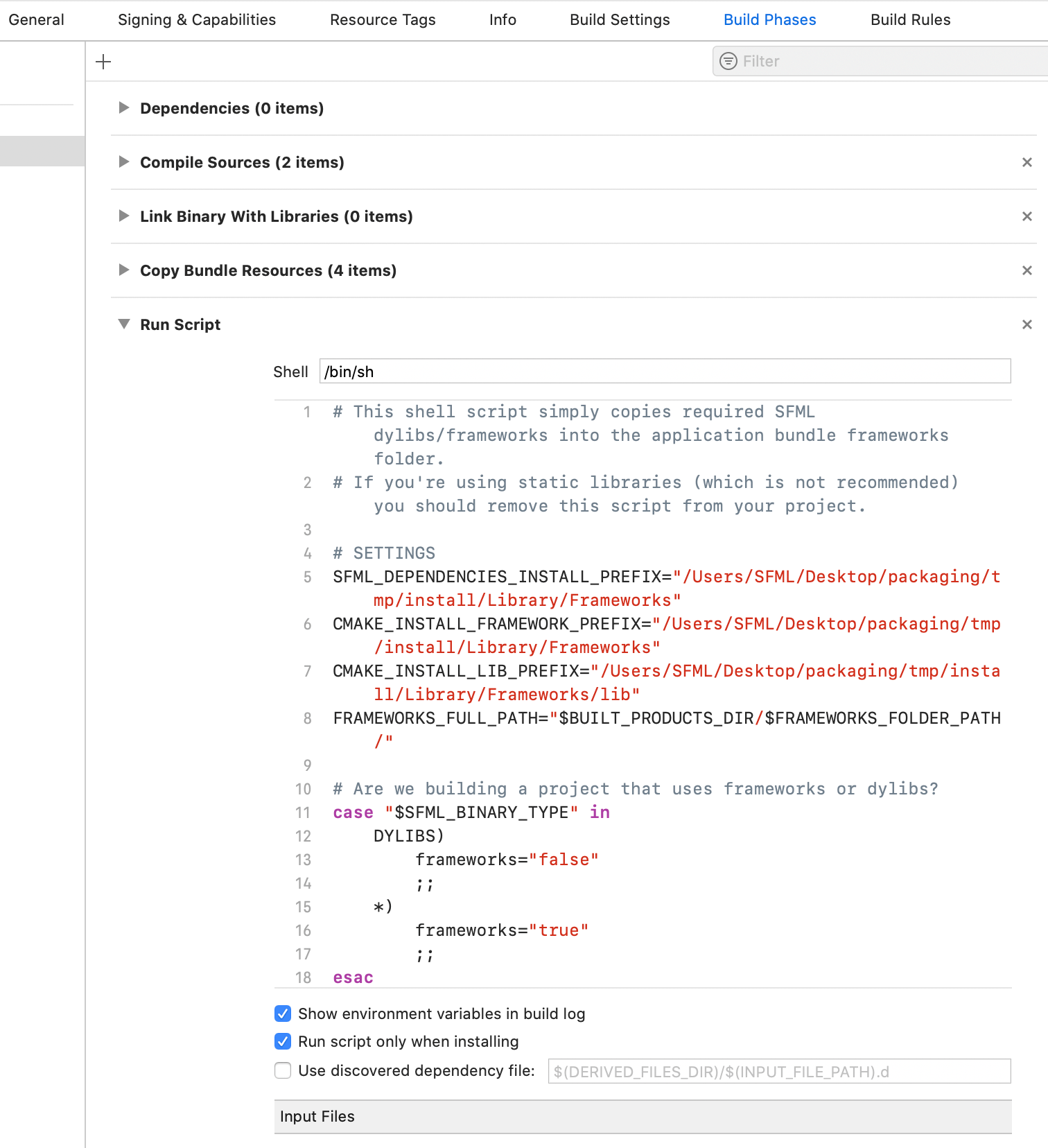
- Target
- Build Phase
- Run Script
- Run Script only when installing:
true
- Run Script only when installing:
- Run Script
- Build Phase
SFML CLT
1 | 2019-12-19 14:36:17.966474+0800 sa[79489:1852939] Metal API Validation Enabled |
2 | 2019-12-19 14:36:18.114539+0800 sa[79489:1853624] flock failed to lock maps file: errno = 35 |
3 | 2019-12-19 14:36:18.116856+0800 sa[79489:1853624] flock failed to lock maps file: errno = 35 |
4 | Failed to load image "icon.png". Reason: Unable to open file |
5 | Program ended with exit code: 1 |
- Target
- Build Phase
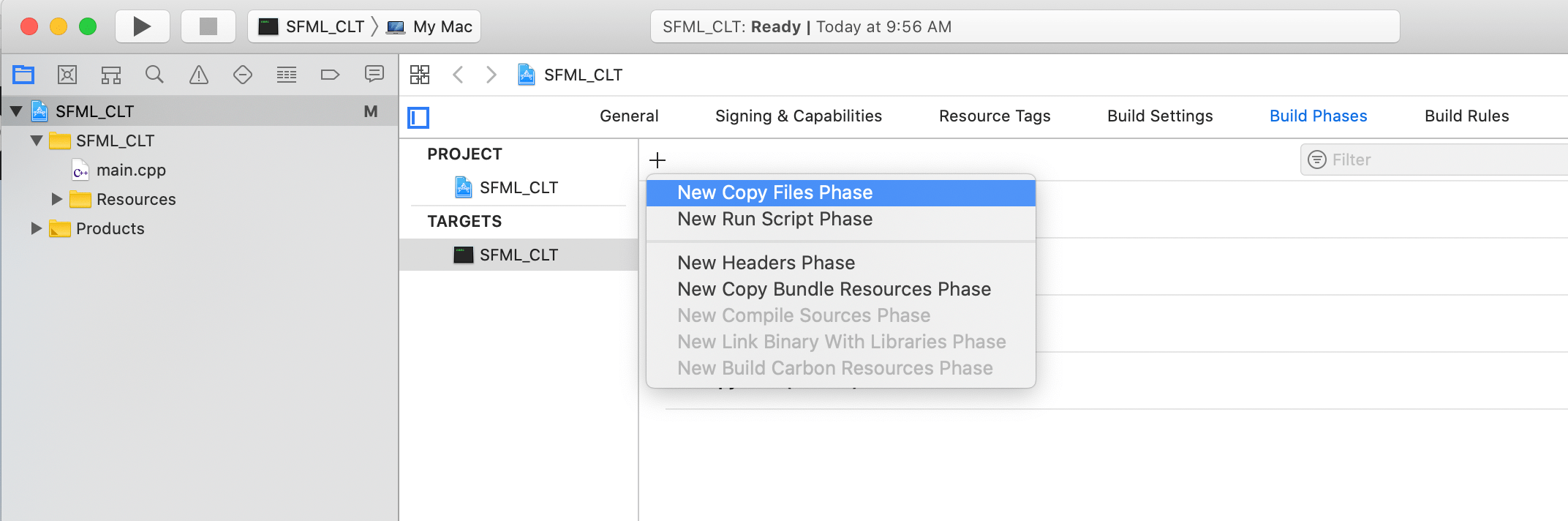
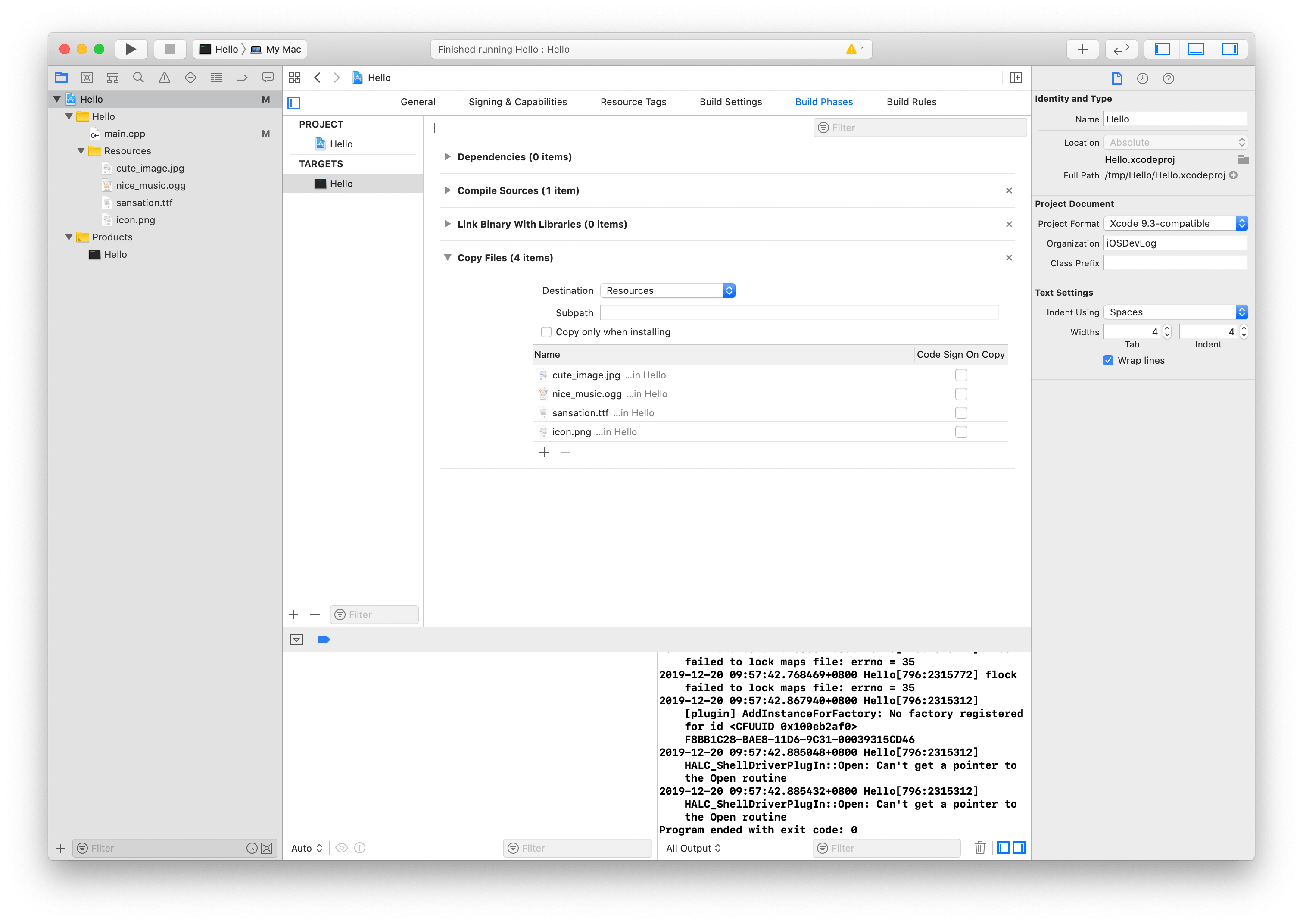
+New Copy Files Phase- add Resources
- Build Phase
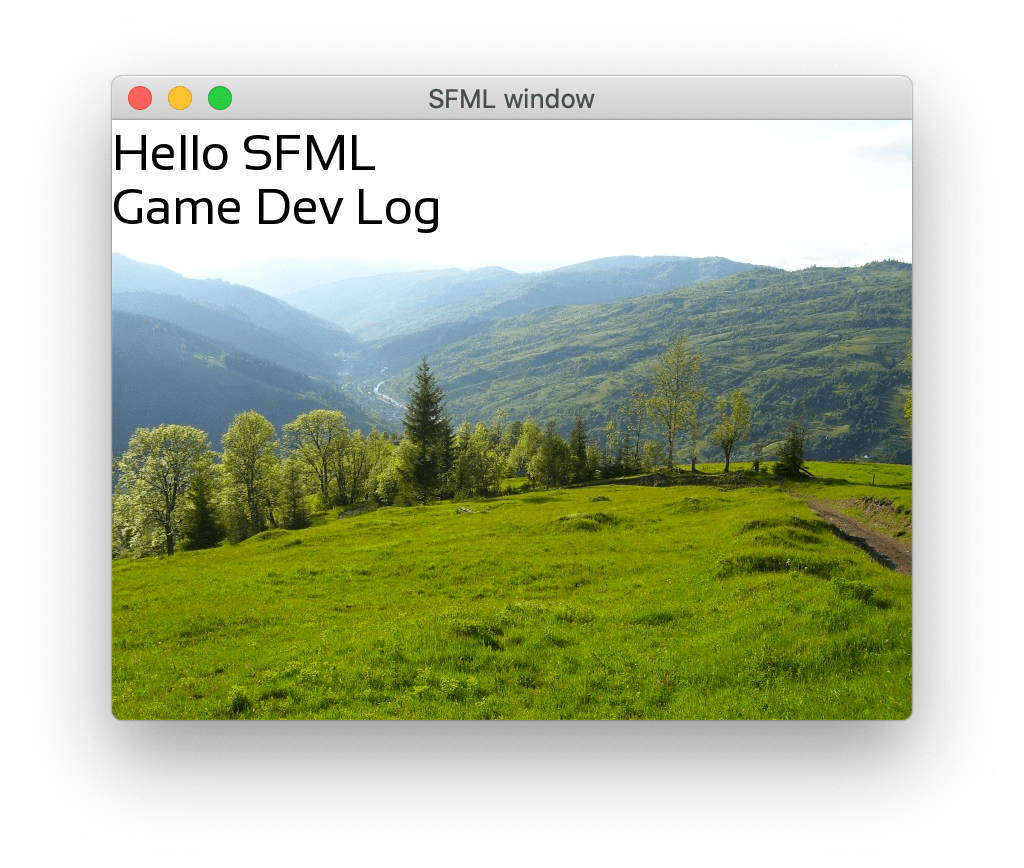
示例
- Window creation / 创建窗口
- Creation of graphic display / 显示图形
- Handle user inputs / 处理输入
- Deal with the user inputs / 处理输入
- Display game objects on the screen / 显示
1 | class Game { |
2 | public: |
3 | // non copyable class |
4 | Game(const Game &) = delete; |
5 | Game &operator=(const Game &) = delete; |
6 | Game(); //< constructor |
7 | void run(); |
8 | |
9 | private: |
10 | void processEvents(); //< Process events |
11 | void update(); //< do some updates |
12 | void render(); //< draw all the stuff |
13 | |
14 | sf::RenderWindow _window; //< the window use to display the game |
15 | sf::CircleShape _player; |
16 | }; |
17 | |
18 | int main(int argc, char *argv[]) { |
19 | Game game; |
20 | game.run(); |
21 | |
22 | return 0; |
23 | } |
= delete是 C++ 11 新特性,允许我们显示删除类的成员函数, 不可copy另一方案是 扩展
sf::NonCopyable= default显示 buildprocessEvents(): This will manage all events from the userupdate(): This will update the entire gamerender(): This will manage all the rendering of the game

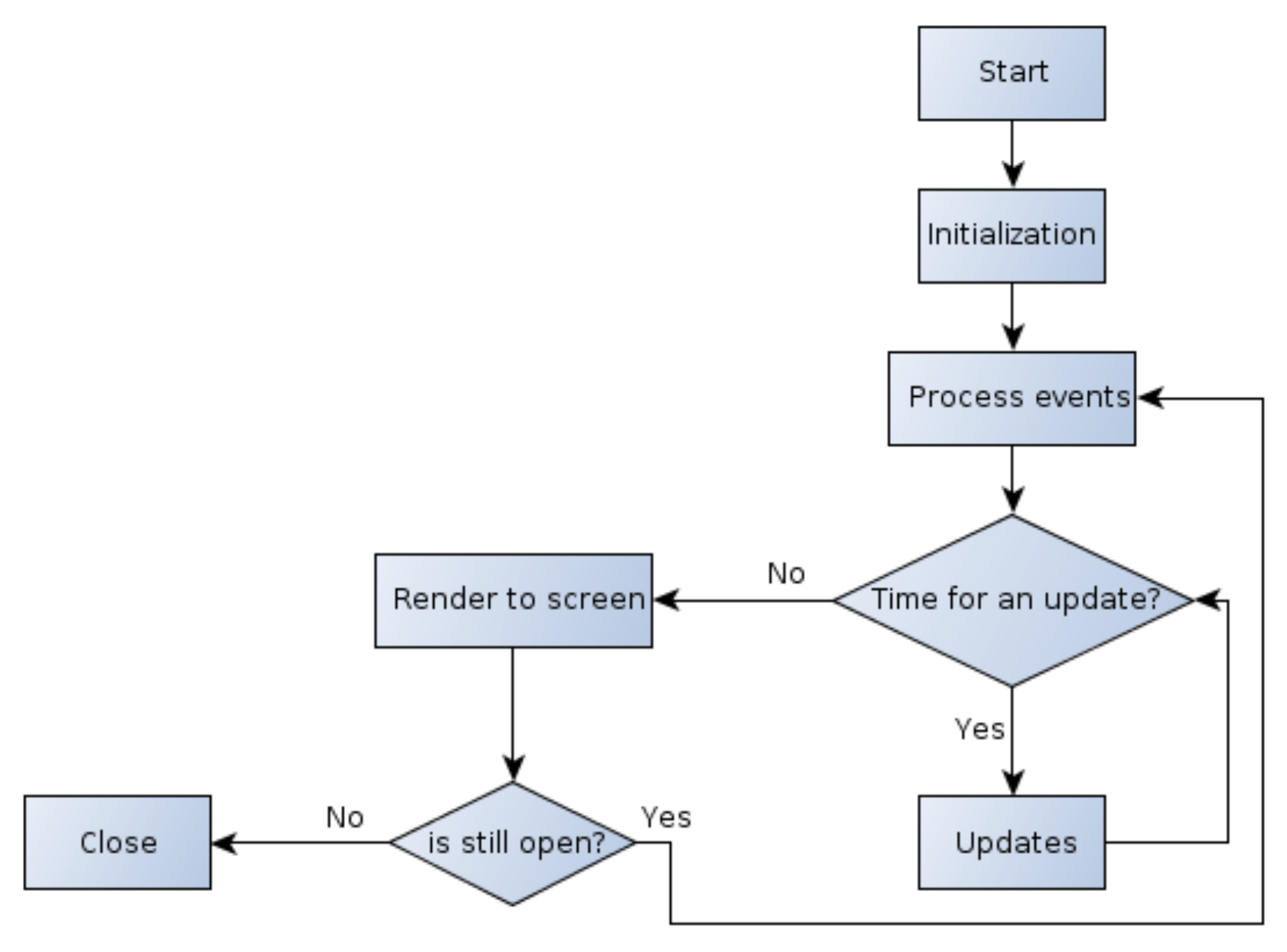
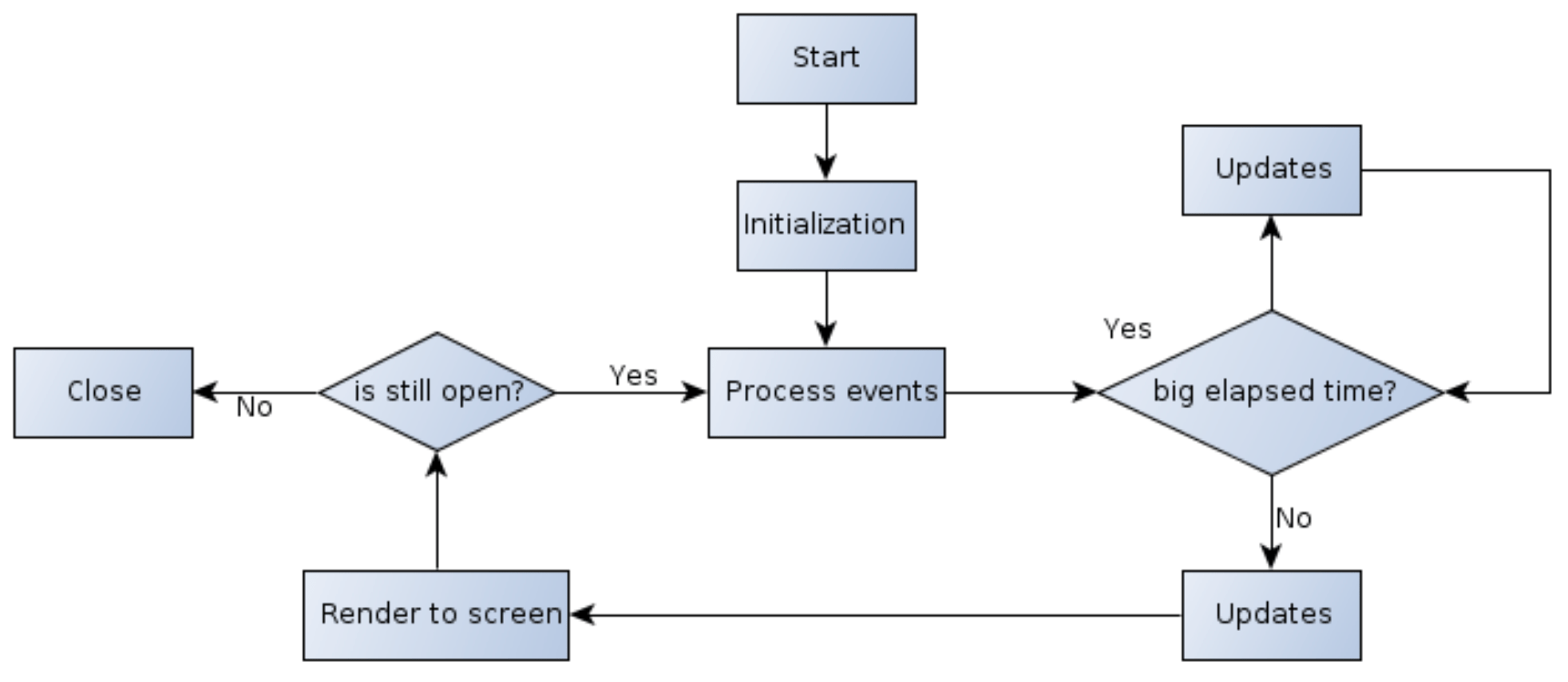
Example 1
CMakeLists.txt
1 | cmake_minimum_required(VERSION 3.1) |
2 | |
3 | set (CMAKE_CXX_STANDARD 11) |
4 | |
5 | project(main) |
6 | |
7 | ## If you want to link SFML statically |
8 | # set(SFML_STATIC_LIBRARIES TRUE) |
9 | |
10 | ## In most cases better set in the CMake cache |
11 | # set(SFML_DIR "<sfml root prefix>/lib/cmake/SFML") |
12 | |
13 | find_package(SFML 2.5 COMPONENTS system window graphics audio network REQUIRED) |
14 | add_executable(main main.cpp) |
15 | target_link_libraries(main sfml-system sfml-window sfml-graphics sfml-audio sfml-network) |
main.cpp
1 | |
2 | |
3 | |
4 | int main(int argc,char* argv[]) |
5 | { |
6 | //the window use for the display |
7 | sf::RenderWindow window(sf::VideoMode(400,400),"01_Introduction"); |
8 | //set the maximum frame per second |
9 | window.setFramerateLimit(60); |
10 | |
11 | //construct a circle |
12 | sf::CircleShape circle(150); |
13 | //set his color |
14 | circle.setFillColor(sf::Color::Blue); |
15 | //set his position |
16 | circle.setPosition(10, 20); |
17 | |
18 | //main loop |
19 | while (window.isOpen()) |
20 | { |
21 | //to store the events |
22 | sf::Event event; |
23 | //process events |
24 | while(window.pollEvent(event)) |
25 | { |
26 | //Close window |
27 | if (event.type == sf::Event::Closed) |
28 | window.close(); |
29 | //keyboard input : Escape is press |
30 | else if (event.type == sf::Event::KeyPressed and event.key.code == sf::Keyboard::Escape) |
31 | window.close(); |
32 | } |
33 | |
34 | //Clear screen |
35 | window.clear(); |
36 | |
37 | //draw the cirle |
38 | window.draw(circle); |
39 | |
40 | //Update the window |
41 | window.display(); |
42 | |
43 | } |
44 | |
45 | return 0; |
46 | } |
shell
1 | cmake . |
2 | make |
3 | ./main |
同时编译多个 cpp 文件
CMakeLists.txt
1 | cmake_minimum_required(VERSION 3.1) |
2 | |
3 | project(MulitExe) |
4 | |
5 | file(GLOB_RECURSE EXTRA_FILES */*) |
6 | add_custom_target(${PROJECT_NAME}_OTHER_FILES ALL WORKING_DIRECTORY ${PROJECT_SOURCE_DIR} SOURCES ${EXTRA_FILES}) |
7 | file(GLOB_RECURSE code_sources "*.cpp") |
8 | |
9 | foreach(code_src ${code_sources}) |
10 | get_filename_component(mexecutable ${code_src} NAME_WE) |
11 | find_package(SFML 2.5 COMPONENTS system window graphics audio network REQUIRED) |
12 | add_executable(${mexecutable} ${code_src}) |
13 | target_link_libraries(${mexecutable} sfml-system sfml-window sfml-graphics sfml-audio sfml-network) |
14 | endforeach() |
小结
参考: